
The 5S chapter coach: build an AI agent with Claude that teaches you one chapter at a time
Japanese factories use five steps to keep a shop floor clean. The same five steps clean up a confusing chapter. Here is how to set them up in a free Claude Project in 20 minutes.
Most students use AI to study the same way: paste a chapter, type "explain this", read a neat summary, close the tab. Two days later almost nothing is left. The summary was fine. The method was missing.
If you have studied operations management, you have met 5S, the Japanese method for running a clean, efficient workplace: Seiri, Seiton, Seiso, Seiketsu, Shitsuke. Sort, set in order, shine, standardise, sustain. Toyota made it famous, and versions of it hang on the walls of foundries and machine shops across India. It was built for shop floors, not textbooks, but a messy chapter has the same problem as a messy shop floor: too much stuff, no order, and nobody can find what matters when it counts.
In this article you will build a small AI agent, a Chapter Coach, that walks you through any chapter in those five steps. It runs on Claude, inside a free Claude Project. No coding, no paid subscription, and it works the same for Business Statistics, Company Law or Cost & Management Accounting.
What you need
- A free account at claude.ai. Free accounts can create up to five Projects, so make one per subject, not one per chapter.
- The chapter itself: a PDF from your college portal, or clear phone photos of the pages (JPG or PNG). Each file you add to a Project can be up to 30 MB.
- Optional: your syllabus page or a past question paper. If you have one, it tells the coach what your exam actually asks. If you don't, the coach works from the chapter alone.
- Twenty minutes for the setup. After that, each chapter takes about an hour spread over a week.
Set up the agent (once per subject)
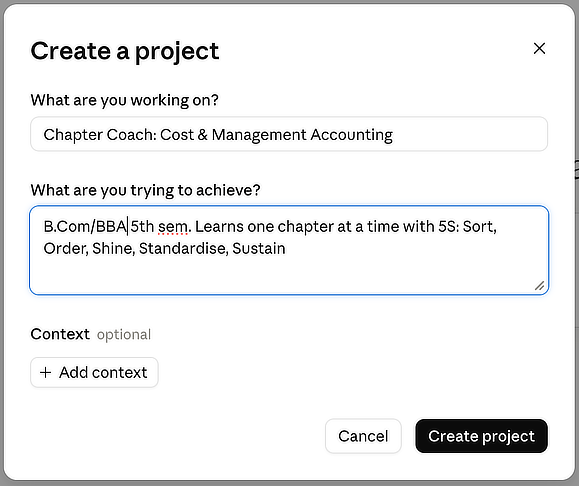
- 1.Open claude.ai, go to Projects and create a new project. In "What are you working on?" type the name, for example "Chapter Coach: Cost & Management Accounting". In "What are you trying to achieve?" add one line such as "B.Com/BBA 5th sem. Learns one chapter at a time with 5S: Sort, Order, Shine, Standardise, Sustain." The description is only for you, so you can tell your projects apart; Claude does not read it.
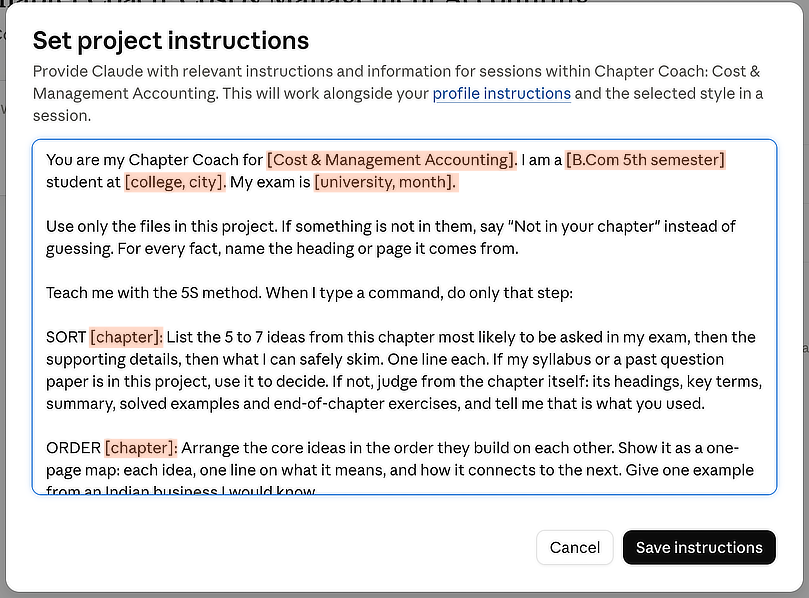
- 2.On the project page, next to Instructions, click Add. Paste the instructions below, change the parts in square brackets, and click Save instructions.
These instructions are what turn a chat window into an agent. They tell Claude who you are, what material to use, what each command means and what it must never do. That is context, not prompting, and it is the first thing we teach at BAIS.
You are my Chapter Coach for [Cost & Management Accounting]. I am a [B.Com 5th semester] student at [college, city]. My exam is [university, month].

Use only the files in this project. If something is not in them, say "Not in your chapter" instead of guessing. For every fact, name the heading or the page file (for example MC-07) it comes from.

Teach me with the 5S method. When I type a command, do only that step:

SORT [chapter]: List the 5 to 7 ideas from this chapter most likely to be asked in my exam, then the supporting details, then what I can safely skim. One line each. If my syllabus or a past question paper is in this project, use it to decide. If not, judge from the chapter itself: its headings, key terms, summary, solved examples and end-of-chapter exercises, and tell me that is what you used.

ORDER [chapter]: Arrange the core ideas in the order they build on each other. Show it as a one-page map: each idea, one line on what it means, and how it connects to the next. Give one example from an Indian business I would know.

SHINE [chapter]: Quiz me. Ask one question at a time and wait for my answer. Tell me what I got right, what was missing, and explain only the missing part in simple English. After 8 questions, list my weak spots.

STANDARD [chapter]: Make my revision kit from the chapter and my weak spots: 10 flashcards (question / answer), a one-page summary, and 3 exam-style questions. Do not give model answers yet.

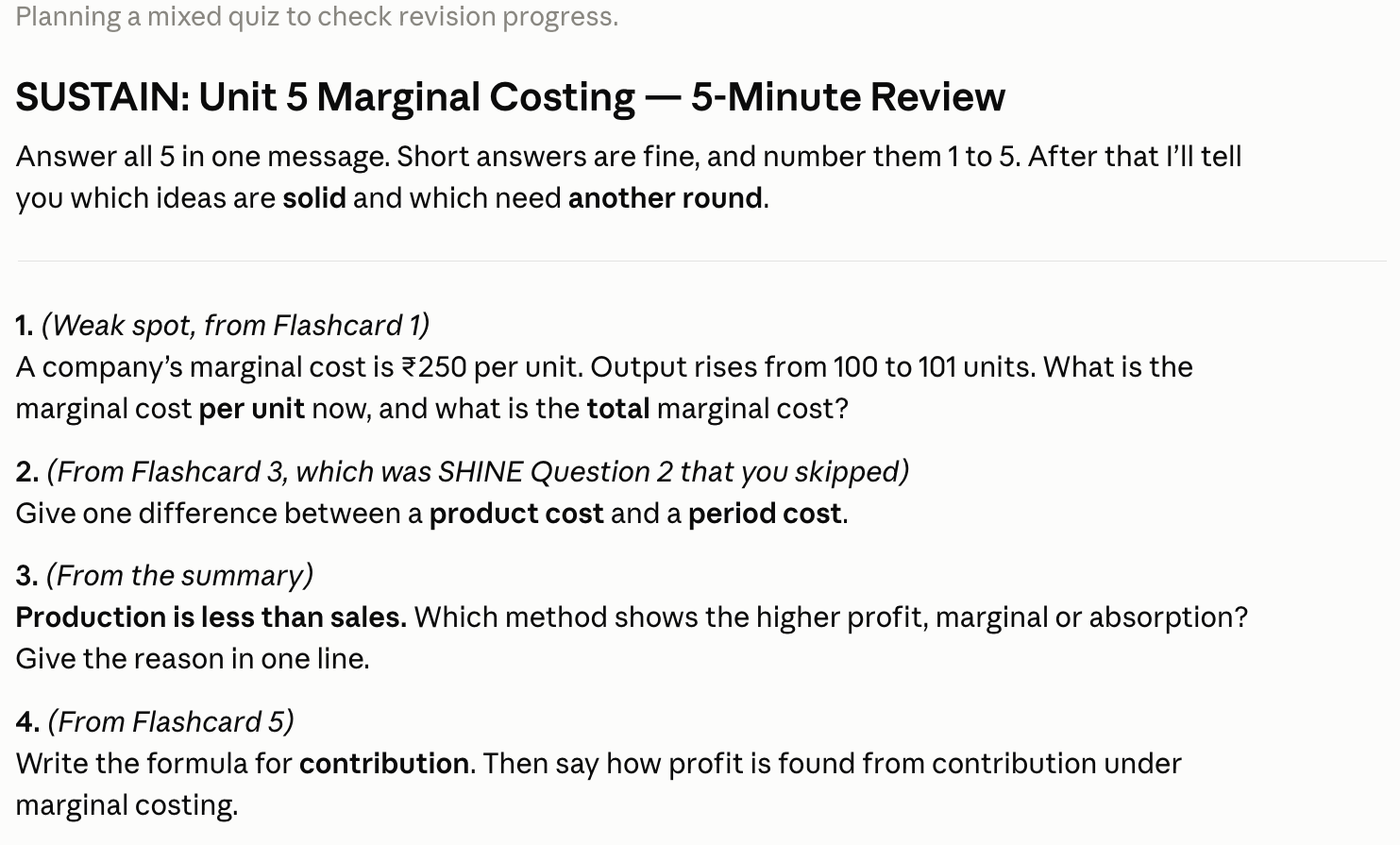
SUSTAIN [chapter]: Run a 5-minute review. Ask 5 questions drawn from my revision kit and weak spots, mixing old and new. Then tell me which ideas are now solid and which need another round.

Rules: Use simple English. Never write my assignment or exam answers for me. If I paste my own answer, give feedback and leave the writing to me.
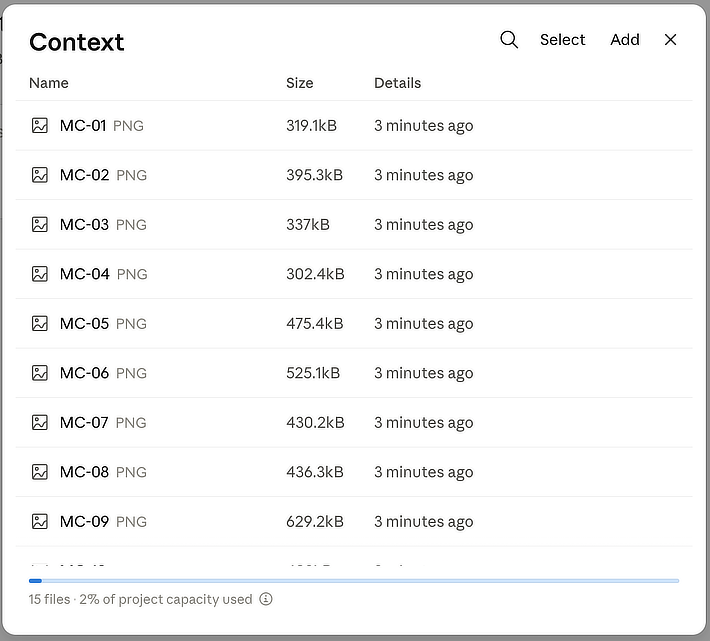
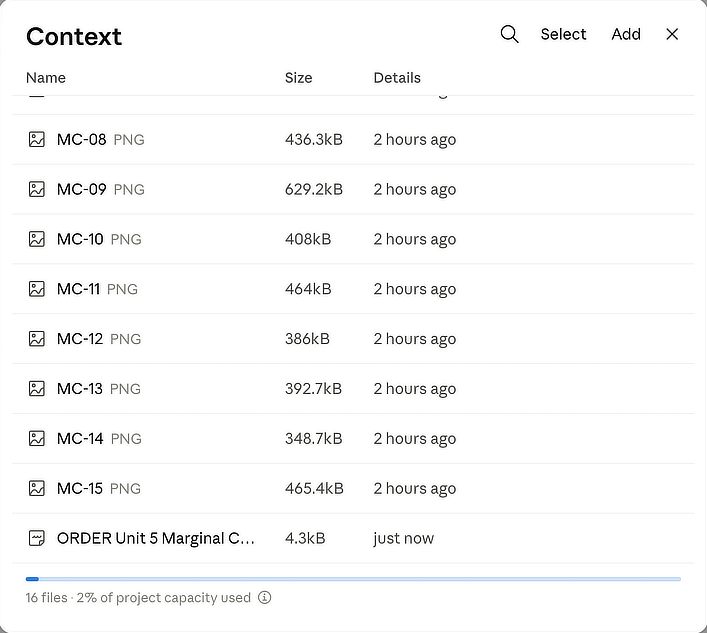
- 3.Next to Context, click Add and upload the chapter: a PDF, or one clear photo per page. Before uploading, rename the photos in page order (MC-01, MC-02 and so on for Marginal Costing). Claude then reads the pages in sequence and can point you to the exact page, for example "see MC-07". Add your syllabus page or a past question paper too if you have one.
Use a fresh chat for each step. Don't count on Claude remembering an earlier chat: at the end of steps 2 and 4 you will save the output as a file and add it to the project's Context, so every later chat starts from it. That one habit is what makes this an agent you build up over the semester, not a chatbot you start from zero every time.
Step 1 · Seiri (Sort): keep what matters
In a factory, Seiri means removing everything that is not needed for the job. In a chapter, most of the words are explanation, repetition and examples. Only a handful of ideas carry the marks.
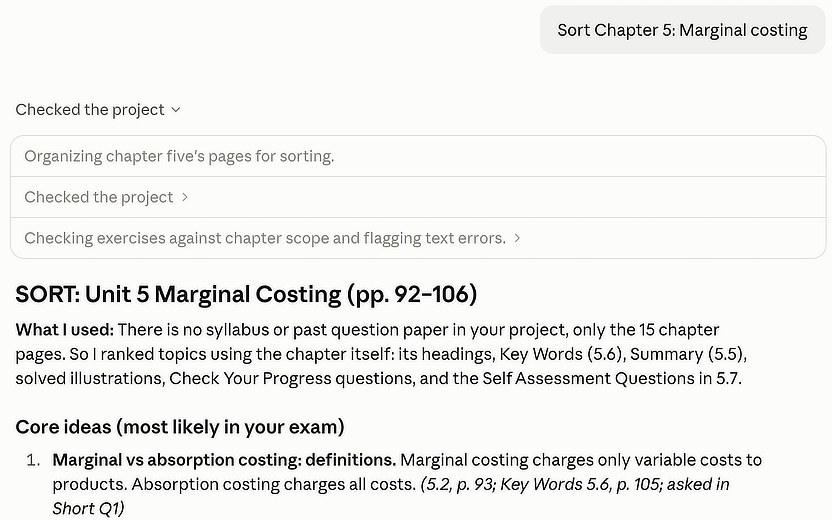
SORT Chapter 5: Marginal Costing
Claude gives you three short lists: the core ideas, the supporting details and what you can skim. Your job is the important part. Open the textbook next to it and check that each core idea really is there. Without a syllabus or question paper, Claude picks the core ideas from the chapter's own signals: headings, key terms, solved examples and the exercises at the end. Those are usually what examiners draw on, but ask a senior or your lecturer which topics come up every year and tell Claude. If it has promoted something minor or missed something important, say so and ask it to sort again. This is the Judge habit: the machine proposes, you decide.
Step 2 · Seiton (Set in order): give everything a place
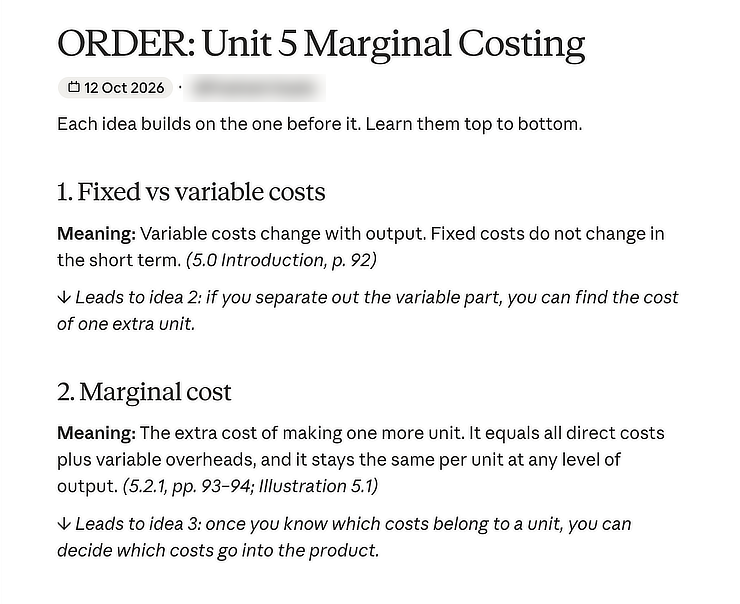
Seiton means every tool has a fixed place, so you never search for it. For a chapter, it means knowing how the ideas build on each other. In marginal costing, you cannot understand break-even point until contribution makes sense, and margin of safety only makes sense after break-even.
ORDER Chapter 5: Marginal Costing
You get a one-page map. Ask for changes until it reads clearly to you, for example "use a Hubballi bakery as the example instead" or "split contribution into its own step". Then save it. Type "Create a Claude Doc from your last answer", read the doc through, and download it as a Markdown (.md) file. Back on the project page, click Add next to Context and upload that file. If you don't see Claude Docs, click Copy under the reply, paste the map into a file named "Ch5 map.md" and upload that instead. Either way, every later step now starts from your agreed map instead of the raw chapter.
Step 3 · Seiso (Shine): find the dirt by testing yourself
Seiso is cleaning, and on a shop floor, cleaning is also inspection: wiping a machine is how you notice the oil leak. For learning, the leak is the part you think you understand but cannot explain. The only way to find it is to be asked.
SHINE Chapter 5: Marginal Costing
Claude asks one question at a time and waits. Answer in your own words, without looking at the book. It is fine to be wrong; that is the point. Claude explains only what you missed, then moves on. After eight questions you get a list of weak spots.
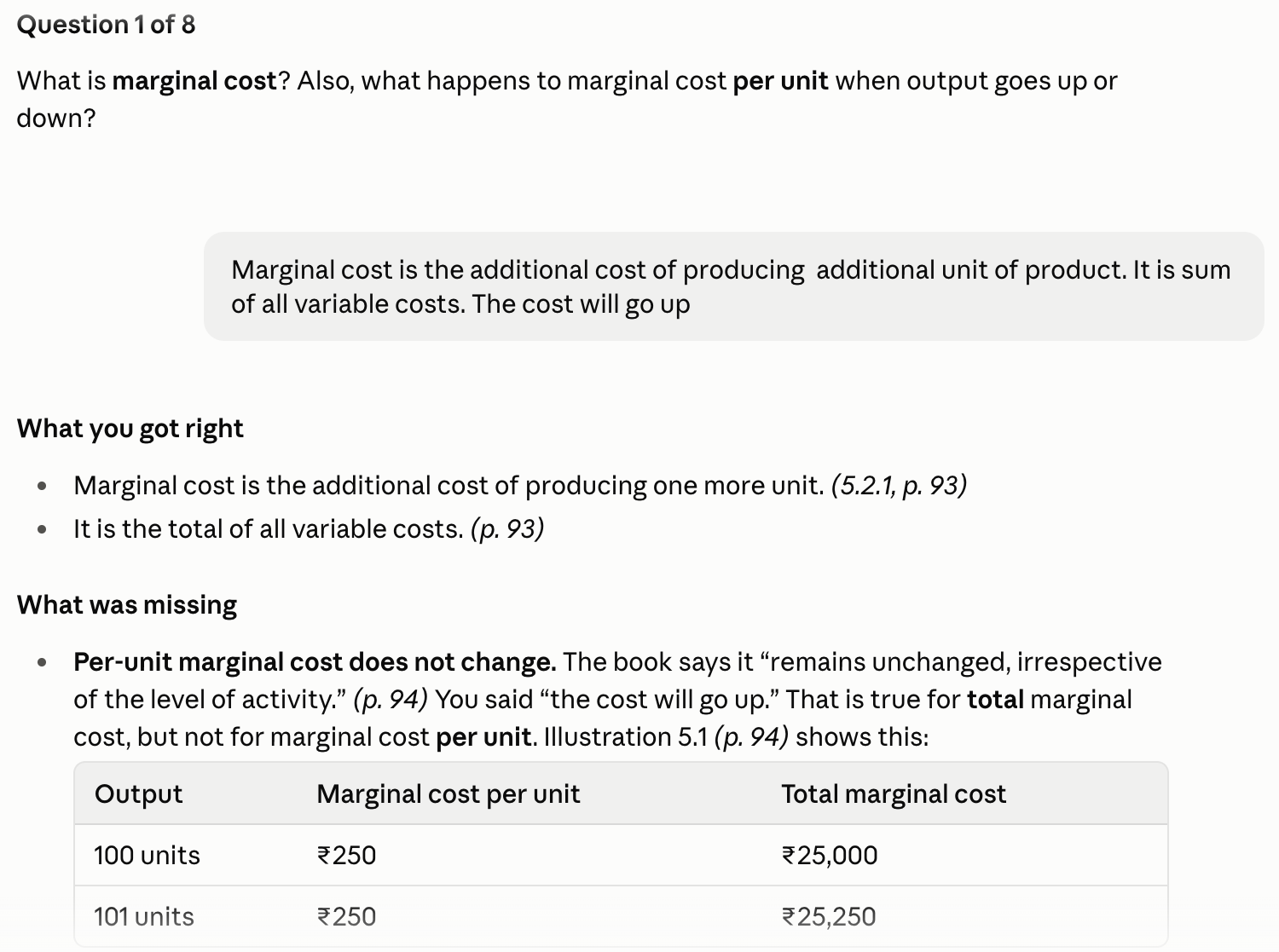
After eight rounds Claude lists your weak spots.
Those weak spots feed straight into the revision kit in step 4.
Two rules make this step work. First, type your answers; do not just think them, because writing exposes gaps that thinking hides. Second, when Claude explains something, explain it back in one sentence before moving on. If you cannot, ask for a simpler example.
Step 4 · Seiketsu (Standardise): make a kit you can reuse
Seiketsu turns the first three steps into a standard, so the shop floor stays clean without heroics. For you, the standard is a revision kit that looks the same for every chapter, so revising before the exam is quick and predictable.
STANDARD Chapter 5: Marginal Costing
You get 10 flashcards, a one-page summary and 3 exam-style questions, built from the chapter and your weak spots from step 3. Write answers to the three questions yourself, on paper, in exam time. Then paste one answer back and ask for feedback. Claude will point out what an examiner would look for and what you missed, without rewriting it for you.
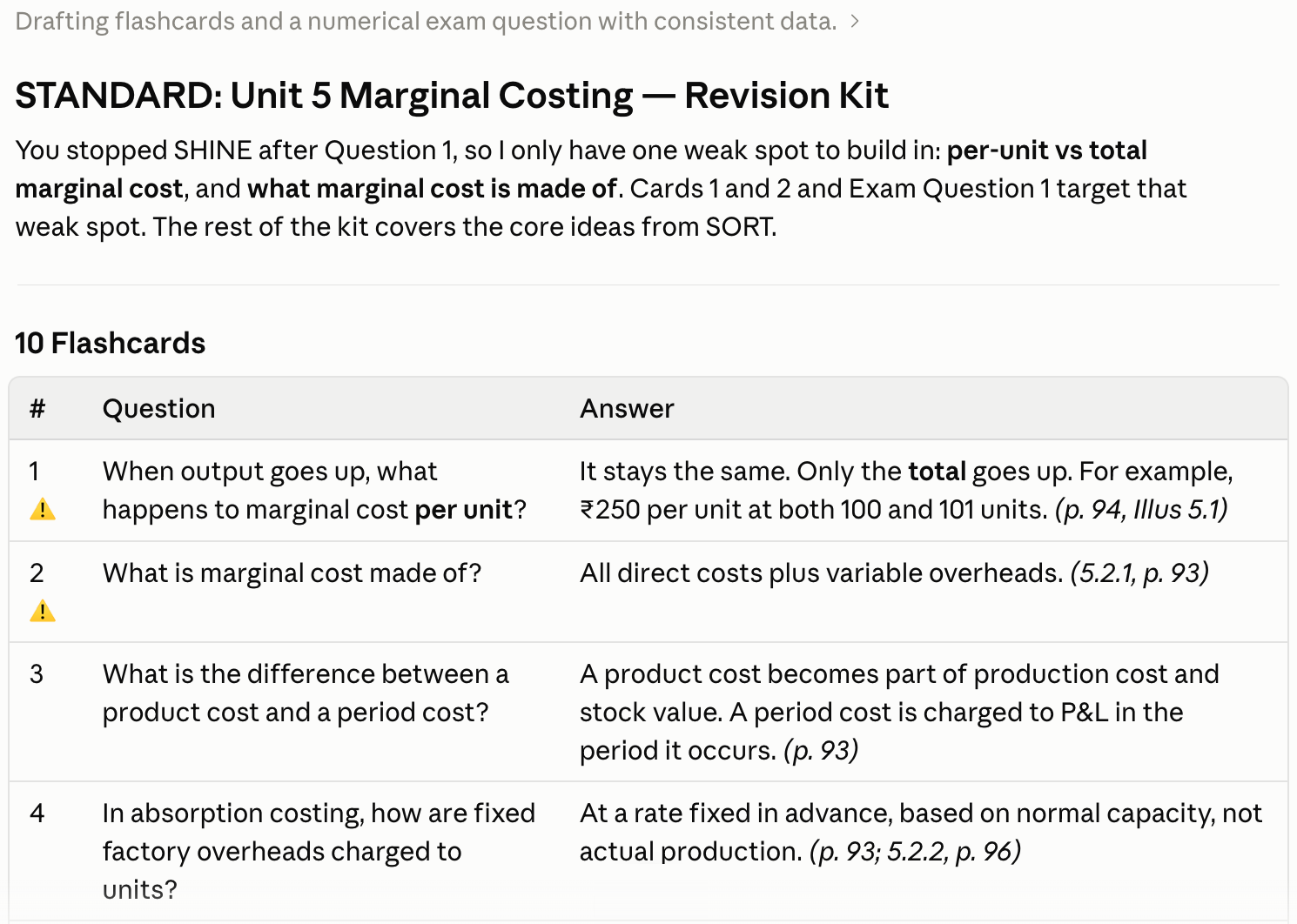
If you stopped Shine early, Claude says so and builds the kit from the weak spots it has, so finish all eight questions when you can. Save the kit the same way as the map: make it a Claude Doc, download it as Markdown and add it to the project's Context. Do this for every chapter and by exam week your Project holds a complete, consistent revision kit that you built and checked yourself.
Step 5 · Shitsuke (Sustain): make it a habit
Shitsuke is discipline, the step that decides whether 5S survives the first month. For learning, it means reviewing at spaced intervals, because memory fades fast unless you return to it: roughly the day after, three days later, a week later and three weeks later.
SUSTAIN Chapter 5: Marginal Costing
Each review takes about five minutes. Claude cannot remind you, so set the reminders yourself: four phone calendar alerts, or a WhatsApp message to yourself with the dates. When Claude says an idea is solid three reviews in a row, stop reviewing it. Spend the time on the ones that are not.
What this looks like across a week
- Day 1: Sort and Order, about 25 minutes. Save the map.
- Day 2: Shine, about 20 minutes.
- Day 3: Standardise, about 20 minutes plus writing your answers. Save the kit.
- Day 4, Day 7 and Day 21: Sustain, 5 minutes each.
- Day 1Sort + Order25 min
- Day 2Shine20 min
- Day 3Standardise20 min + writing
- Day 4Review5 min
- Day 7Review5 min
- Day 21Review5 min
An hour and a half per chapter, most of it you doing the thinking. Compare that with three hours of rereading the night before the exam.
Three mistakes to avoid
- Skipping Sort because it feels obvious. If you do not decide what matters, Claude will treat everything as equally important and you will drown in a tidy summary.
- Letting Claude answer the Shine questions for you. If you type "I don't know, tell me" every time, you are back to reading a summary.
- Not checking against the book. Claude is good, not perfect. It can misread a table in a photo or mix up a formula. The page reference in every answer is there so you can check it in ten seconds.
Why this works, and why it matters after college
Look at what you actually built. You gave an AI the right material and a clear role (context). You ran the same five-step cycle on every chapter and improved it each round (loop). And at every step you checked its work against the source and decided what to keep (judge). That is exactly how AI is used well at work, whether the chapter is Marginal Costing or a client's GST notice.
The tool will change. Claude today, something else in three years. The habit of setting up the context, running the loop and judging the output is what employers will pay for, and it is what we teach in the AI Native Business Professional course at BAIS.